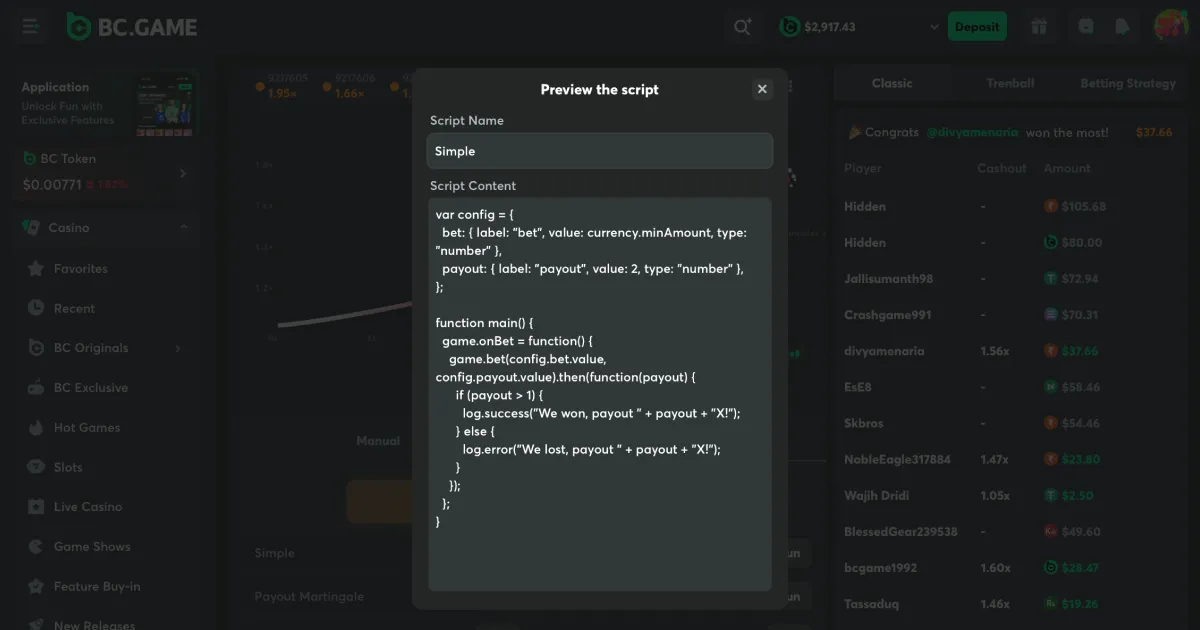
Betting Scripts for Crash, Dice and Limbo
Automating strategies on platforms like BC.Game and Nanogames involves using JavaScript to interact with the game’s logic, typically through a built-in “Advanced” or “Auto” mode.
These betting scripts are essentially small plugins. While most people use the standard auto-betting buttons (like “double on loss”), these scripts allow you to go beyond those basic options and create much more complex instructions.
When Should I Use Betting Scripts?
Let’s say you understand betting strategies and want to implement or combine them; you don’t care about the randomness of the outcome, because randomness in crash games is a mathematical pseudo-random model, and the random number generator doesn’t always generate truly random numbers. Why not wait for, say, three 1x outcomes in a row and then start a series of rounds using you own strategy? Well, if you’re thinking along those lines, you’re on the right track.
How It Works
The platform provides a code editor within the game interface (usually under Auto -> Advanced or Add Script). The script runs in a loop, listening for game events (like “Game Started” or “Game Ended”) and executing commands based on the logic you write.
- Event Listening: The script waits for the game engine to broadcast the result of a round.
- Logic Execution: It checks whether you won or lost and applies your strategy (e.g., Martingale, Labouchere).
- Action: It sends a new bet command to the server with the calculated amount and target multiplier.
Common Script Structures
You can use the following simple template as a starting point to create your own betting strategy for BG.Game or Nanogames Crash. It tracks profit, places a fixed bet and logs the result of each round.
var config = {
  baseBet: { value: 100, type: "number", label: "Base Bet" },
};

function main() {
  let userProfit = 0;
  const PAYOUT = 2;

  game.on("GAME_STARTING", function () {
    log.info("********");
    log.info("NEW GAME");
    game.bet(config.baseBet.value, PAYOUT);
  });

  game.on("GAME_ENDED", function () {
    let gameInfo = game.history[0];

    if (gameInfo.odds < PAYOUT) {
      log.info("Lost...");
      userProfit -= config.baseBet.value;
    } else {
      log.info("Won!");
      userProfit += config.baseBet.value;
    }

    log.info("Current profit: " + currency.currencyName + userProfit);
    log.info("END GAME");
  });
}
Popular Strategies
Martingale: Double your bet after every loss; reset to the base bet after a win. It aims to recover all losses with one win but risks hitting the table limit or “busting” your balance.
Payout Martingale: Instead of increasing the bet, you increase the target payout (multiplier) after a loss.
1.01x Strategy: Placing high bets on a very low multiplier (1.01x) to farm small, frequent wins. Caution: A “0.00x” or “1.00x” crash will wipe out many small wins instantly.
How to Use Them
- Find the Script Area: Go to the game (e.g., Crash), switch to Auto mode, and look for Advanced or Scripts.
- Paste the Code: You can write your own or find community-shared scripts on GitHub or the platform’s forums.
- Run/Start: Always test scripts with “JB” (test currency) or extremely small amounts first.
Where can I find betting scripts?
You can find ready-made scripts on the BC.Game and Nanogames websites, on the Telegram channel Crash game scripts, or write your own. If you decide to write your own, be sure to study the official API and test it using the minimum stakes.